HVAC basics • Updated Mar 24, 2026 • 14 min read
Thermostat basics for renters: settings, filters, and when to call
 By Michael Rivera · Updated Mar 24, 2026
Why is it 78 degrees in here when the thermostat says 72? Or the opposite: you've cranked the heat to 80 and the apartment is still cold. Before you file a maintenance ticket, it's worth understanding how your thermostat actually works--because about half the comfort complaints I respond to come down to a setting issue or a dirty filter, not a broken system.
I've walked hundreds of tenants through their thermostat settings. Here's what I've learned works.
One firm rule before we start: never open the HVAC unit itself, never touch refrigerant lines, and never mess with electrical wiring inside the air handler or furnace. Your thermostat and your filter--that's the renter boundary. Everything behind the panel is maintenance territory. Within that boundary, though, there's a lot you can do to stay comfortable without waiting three days for a service visit.
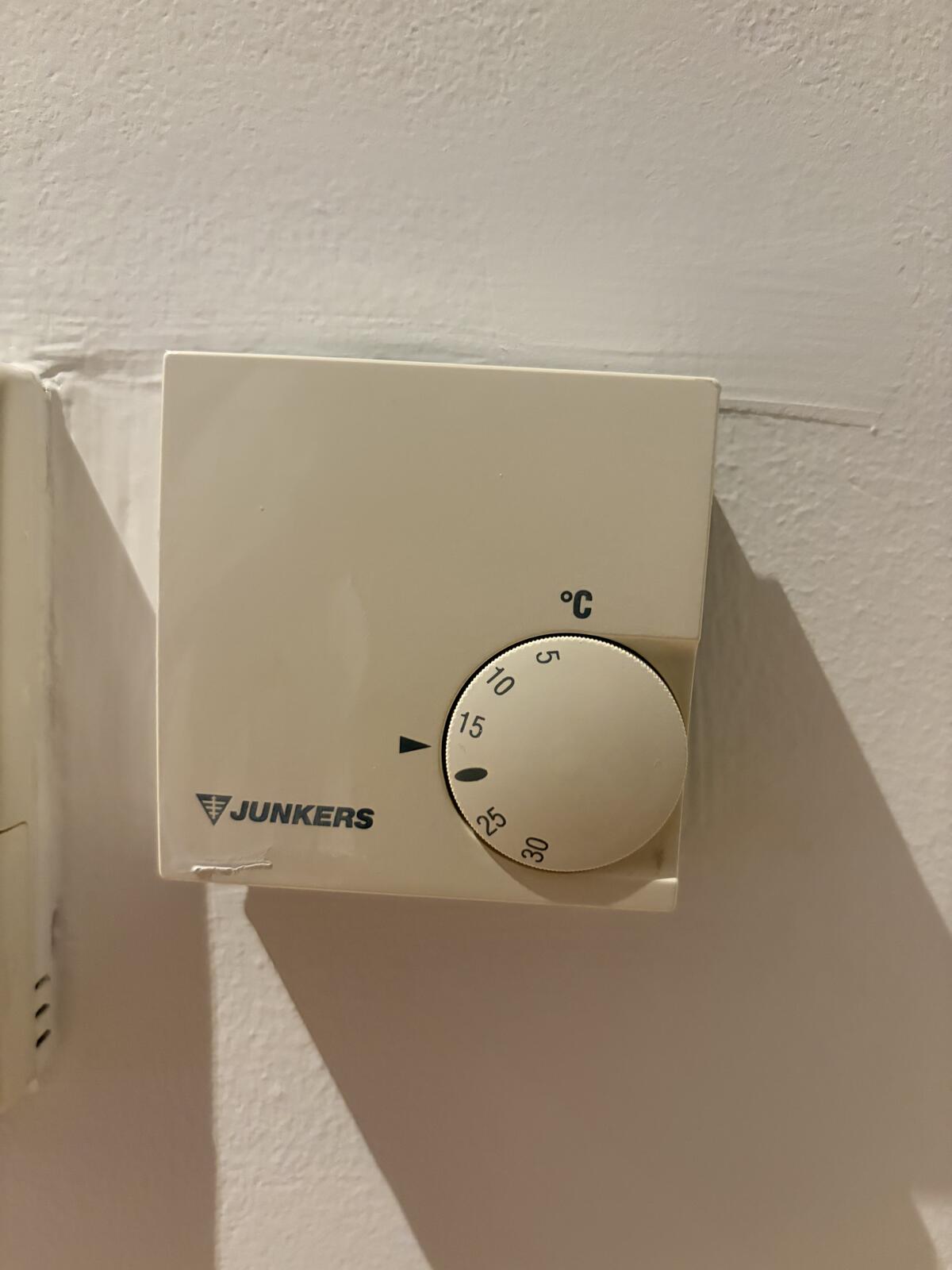
Know your thermostat type
Before adjusting anything, it helps to understand what you're working with. There are three common types in rental units, and each one behaves a little differently.
| Type | What it looks like | What you can do | Renter notes |
|---|---|---|---|
| Manual (dial/slider) | Round dial or simple slider, often older units | Set a temperature, switch between heat/cool/off | No scheduling. The number on the dial may not match the actual room temperature exactly — that's normal for older units. |
| Programmable | Digital screen with buttons, may have day/time settings | Set schedules (wake, leave, return, sleep), adjust hold temps | If you can't figure out the schedule, use the "Hold" or "Override" button to set a manual temperature until you read the manual. |
| Smart (Nest, Ecobee, etc.) | Color screen, Wi-Fi connected, sometimes app-controlled | Adjust via screen or app, set schedules, view energy usage | Your landlord may control some settings remotely. If the thermostat resets itself, ask whether there's a landlord-side schedule or temperature limit active. |
If you have a programmable or smart thermostat and it seems to change temperature on its own, it's almost certainly following a schedule someone set — possibly a previous tenant or your landlord. Check the schedule screen before assuming something is broken.
Understanding the modes
Every thermostat has a system mode switch. Getting this wrong is the single most common reason renters think the HVAC is broken.
- Heat: The system will only produce warm air. If the room is already above the set temperature, nothing happens.
- Cool: The system will only produce cold air. If the room is already below the set temperature, nothing happens.
- Auto: The system switches between heating and cooling as needed. This is convenient but can cause short-cycling if the heat and cool set points are too close together. Keep at least a 3-degree gap between your heat and cool settings.
- Off: The HVAC system does nothing. The fan may still run if set to "On."
- Emergency heat (heat pumps only): Forces the backup heating element on. Only use this if your landlord or maintenance tells you to — it's expensive and usually means the heat pump can't keep up in extreme cold.
Fan settings
- Auto: Fan runs only when the system is actively heating or cooling. This is the default and the most energy-efficient setting for most situations.
- On: Fan runs continuously, even when no heating or cooling is happening. This circulates air and can help even out temperatures between rooms, but it uses more energy and can feel "drafty" in winter since the air won't always be warm.
If you're not sure, leave the fan on Auto.
Recommended temperature settings
These are practical starting points. Adjust based on your comfort — the goal is to avoid extremes that waste energy or strain the system.
| Season | When you're home | When you're away / sleeping | Why |
|---|---|---|---|
| Summer | 74–78 °F (23–26 °C) | 80–82 °F (27–28 °C) | Every degree lower costs roughly 3% more energy. 78 °F is the sweet spot for most people once they acclimate. |
| Winter | 68–72 °F (20–22 °C) | 62–66 °F (17–19 °C) | Lowering the setting 7–10 degrees for 8 hours can cut heating costs by up to 10% annually. |
| Shoulder seasons (spring/fall) | 68–74 °F (20–23 °C) | Off or minimal | Many days won't need HVAC at all. Open windows when outdoor air is comfortable. |
A word about minimum settings in winter: Even if you leave for a long weekend, don't set the thermostat below 55 °F (13 °C). In cold climates, pipes can freeze and burst — and that's a damage claim you definitely want to avoid. Some leases mandate a minimum temperature for this reason.
I want to share something that happened last winter because it illustrates how much a basic thermostat check can matter. I got an emergency call from a tenant on a Saturday night--she said the heat was completely out and the apartment was 58 degrees. I drove over expecting a dead furnace. When I walked in, the thermostat was set to "Cool" at 72. Her kid had been playing with the buttons earlier that day. I switched it to "Heat," and warm air started blowing within two minutes. She was embarrassed, but honestly, I see this at least once a month. No one reads the manual, the modes aren't intuitive, and the buttons are right there at kid height. Zero judgment--but it's why I always say: check the mode first.
HVAC filters: the thing most renters ignore
The air filter is the single biggest maintenance item that renters often overlook. A clogged filter restricts airflow, makes the system work harder, raises energy bills, and can shorten the life of the HVAC equipment. In many leases, changing the filter is the tenant's responsibility.
Check your lease first
Some leases explicitly assign filter changes to the tenant. Others handle it through maintenance. Before you buy filters, check your lease or ask your landlord. If it's your job, here's what you need to know.
How often to check
- Every 30 days: Pull the filter out and hold it up to a light. If you can't see light through it, it's time to replace.
- Every 60–90 days: Replace a standard 1-inch filter even if it looks okay. Dust builds up faster than you'd think.
- Sooner if: You have pets (pet hair clogs filters fast), live near construction, run the HVAC constantly during extreme weather, or notice dust accumulating faster than usual.
Finding the right size
- Look at the current filter. The size is printed on the frame — something like 16x20x1 or 20x25x1 (length x width x depth in inches).
- Write it down or take a photo. Filters come in dozens of sizes and getting the wrong one means a trip back to the store.
- Check the MERV rating. MERV 8–11 is the standard range for most residential HVAC systems. Higher MERV ratings (13+) trap more particles but can restrict airflow in systems not designed for them. Don't go higher than what your system was built for — ask maintenance if you're unsure.
How to swap a filter (step-by-step)
- Turn off the HVAC system at the thermostat. This is a precaution — you don't want the fan pulling air while the filter slot is open.
- Find the filter location. Common spots: a return air vent on a wall or ceiling (with a hinged grille), or a slot on the side of the air handler/furnace. If you can't find it, ask maintenance rather than removing panels you shouldn't.
- Slide the old filter out. Note the airflow direction arrow printed on the frame — it should point toward the ductwork (into the system, away from the room).
- Slide the new filter in with the arrow pointing the same direction.
- Close the grille or slot and turn the system back on.
- Write the date on the filter edge with a marker so you know when you installed it.
If the filter slot is behind a panel that requires tools to open, or if it's inside the furnace cabinet, that's typically maintenance territory in a rental. Stick to accessible return-air vents.
Energy-saving tips for renters
You can't upgrade the HVAC or add insulation, but you can control how efficiently the system runs day to day.
- Use setback temperatures. Drop the heat 7–10 degrees when you leave for work or go to sleep. If your thermostat is programmable, set a schedule so you don't have to remember.
- Don't crank it to extremes. Setting the thermostat to 85 °F won't heat the room faster — the system delivers air at the same rate regardless. You'll just overshoot and waste energy.
- Keep vents open and unblocked. Furniture, curtains, and rugs over floor vents restrict airflow. Move items at least 6 inches away from supply and return vents.
- Close blinds in summer, open them in winter. South-facing windows gain significant solar heat. Use that to your advantage in cold months and block it in warm months.
- Use ceiling fans correctly. In summer, the fan should spin counterclockwise (you should feel a breeze below). In winter, switch it to clockwise at low speed to push warm air down from the ceiling without creating a draft.
- Seal obvious drafts. If air leaks around windows or doors, even simple draft stoppers help the HVAC system work less. See our drafty window guide for reversible solutions.
- Change the filter on schedule. A dirty filter is like trying to breathe through a pillow. The system uses more energy to push air through a clogged filter.
- Don't constantly toggle between heat and cool. If daytime highs and nighttime lows are close, consider leaving the system off and using a fan or extra blanket instead.
Why is it not cooling? (diagnostic table)
Before you call, walk through this table. About half of the "broken AC" calls I've responded to over the years were one of these simple issues.
| Symptom | Possible cause | What you can check |
|---|---|---|
| Air is blowing but not cold | Thermostat set to "Heat" or "Fan Only," dirty filter, frozen evaporator coil | Verify mode is set to "Cool." Check the filter. If you see ice on the indoor unit or copper lines, turn the system off and call maintenance. |
| No air coming from vents at all | System is off, breaker tripped, blower motor failure | Check the thermostat is on and set correctly. Check your electrical panel for a tripped breaker (flip it fully off, then back on). If it trips again, stop and call maintenance. |
| Air is cold but rooms stay warm | Dirty filter, closed/blocked vents, undersized system for extreme heat | Replace the filter. Make sure all vents are open and unblocked. On extreme heat days (100 °F+), many residential systems can only manage a 20-degree difference from outdoor temp. |
| System runs constantly but doesn't reach the set temp | Dirty filter, refrigerant low, extreme outdoor temps, poor insulation | Replace the filter. If it still can't keep up, this is a maintenance call — you've done what you can. |
| Thermostat screen is blank | Dead batteries, tripped breaker, wiring issue | Replace thermostat batteries (most use AA or AAA). Check the breaker. If neither works, call maintenance. |
| System short-cycles (turns on/off every few minutes) | Dirty filter, thermostat location issue (near heat source), oversized system | Replace the filter. If the thermostat is in direct sunlight or near a lamp/oven, it reads a higher temperature than the room actually is — mention that to maintenance. |
Why is it not heating? (diagnostic table)
| Symptom | Possible cause | What you can check |
|---|---|---|
| No warm air from vents | System set to "Cool" or "Off," tripped breaker, pilot light out (gas furnace) | Verify mode is "Heat." Check the breaker. For gas furnaces, if you smell gas, leave and call your gas company — never attempt to relight a pilot yourself in a rental unless your landlord has explicitly shown you how and your lease allows it. |
| Warm air blows but house stays cold | Dirty filter, air leaks, setting too low | Replace the filter. Check that the set temperature is actually above the current room temperature. Check for window drafts. |
| Heat pump blowing lukewarm air | Normal operation (heat pumps produce lower-temp air than furnaces), defrost cycle, low refrigerant | Heat pump air feels cooler than a furnace but still heats the room. If the outdoor unit is iced over and the defrost cycle doesn't clear it, call maintenance. |
| System makes loud banging when heat turns on | Ductwork expansion (usually harmless), delayed ignition (gas furnace — not harmless) | Ductwork "pops" from temperature changes are common. A loud boom from the furnace itself could be delayed ignition — call maintenance and don't ignore it. |
Thermostat placement matters (and you can't move it)
The thermostat reads the temperature where it's mounted. If it's near a heat source, in direct sunlight, or on an exterior wall, it may read higher or lower than the actual room temperature. You can't move it in a rental, but knowing this helps explain weird behavior.
- Thermostat in the hallway, but bedroom is cold? The hallway might reach the set temperature before the bedroom does. The system shuts off because the thermostat is satisfied, even though other rooms aren't. Keeping interior doors open can help equalize temperatures.
- Thermostat near a sunny window? In the afternoon it may read 5+ degrees warmer than the shaded side of the apartment. Closing blinds near the thermostat can reduce this.
- Thermostat on an exterior wall? It may read colder than the room actually is, causing the system to overheat the space. Mention this to maintenance if you notice the system running excessively.
Common thermostat mistakes renters make
- Setting it and forgetting it at the same temperature 24/7. Even a small setback when you're away saves real money and reduces wear.
- Cranking it all the way up/down to heat/cool faster. The system delivers air at the same rate no matter what you set. You'll just overshoot.
- Switching between heat and cool multiple times a day. In shoulder seasons, it's tempting. But rapid switching stresses the compressor. If temps swing, use "Auto" mode with a reasonable gap between heat and cool set points, or just open a window.
- Ignoring "Replace Filter" alerts. If your thermostat has a filter reminder, it's based on runtime hours, not a calendar. Don't dismiss it.
- Covering vents with furniture and blaming the thermostat. A blocked vent in a bedroom means the room won't reach temperature, but the thermostat (somewhere else) doesn't know that.
When to call maintenance
You've checked the thermostat settings, replaced the filter, ensured vents are open, and it still isn't working. Here's when to file a ticket:
- No response at all after verifying settings and checking the breaker.
- Strange smells — burning, metallic, or rotten-egg (gas). For gas smells, leave the unit immediately and call your gas company, then your landlord.
- Ice on the indoor unit or refrigerant lines — turn the system off and call maintenance.
- Water pooling around the indoor unit — the condensate drain may be clogged.
- System runs nonstop but can't reach the set temperature (after replacing the filter).
- Loud or unusual noises from the furnace, air handler, or outdoor unit that aren't normal ductwork sounds.
- Thermostat screen dead after replacing batteries and checking the breaker.
- Breaker trips repeatedly — never keep resetting a breaker that won't stay on. That's a safety issue.
Maintenance request template (copy/paste)
Subject: HVAC not heating / not cooling properly — thermostat and filter checked
Hi [Landlord/Maintenance], the HVAC system is [not heating / not cooling / blowing room-temp air / making unusual noise]. I've confirmed the thermostat is set to [Heat/Cool] at [X] degrees, the fan is on Auto, and I replaced the air filter on [date]. The breaker is [fine / tripped and I reset it once]. The issue started [date/description]. Could you please send someone to inspect the system? I'm available [times] and can share photos if helpful. Thank you.
Quick seasonal HVAC checklist
Keep this somewhere handy — a quick pass at the start of each season prevents most comfort problems.
- Before summer: Switch to "Cool," set to 76–78 °F, replace the filter, make sure the outdoor unit isn't blocked by debris or plants (leave 2 feet of clearance around it if you have access).
- Before winter: Switch to "Heat," set to 68–70 °F, replace the filter, check that all vents are open and unblocked. Test the heat before you actually need it — finding out it's broken on the first cold night is no fun.
- Monthly (all year): Visually check the filter. If it looks gray and clogged, replace it. If you have a "Replace Filter" reminder, don't ignore it.
A note on smart thermostats in rentals
If your rental came with a Nest, Ecobee, or similar smart thermostat, a few things to be aware of:
- The landlord may have remote access. If you notice temperature changes you didn't make, ask your landlord whether they manage the thermostat settings remotely or have set temperature limits.
- Don't remove or replace the thermostat. Even if you think the wiring is "simple," swapping thermostats in a rental can cause wiring damage, void warranties, or violate your lease.
- "Learning" features can be confusing. Nest thermostats learn your schedule over time. If it seems to change temperature unpredictably in the first few weeks, it's building a pattern. You can turn off the learning feature in settings if you prefer manual control.
- App access may be shared. If you're connecting the thermostat to your Wi-Fi, be aware that the landlord's account may still be linked. Check with them if you have concerns about who can control it.
Was this guide helpful? Have a correction or tip? Email [email protected].
Renter for 15+ years. I write practical, landlord-safe fixes I've actually done in my own apartments — no permits, no drama, deposit intact. More about me →